


In 2023, AI was a magic trick. It looked cool at first, but after seeing it a few more times, you could start to see how the trick was done. It seemed less impressive, and the resulting images felt less like magic and more like a novelty.
Our early experiments with AI in Photoshop yielded many six-fingered hands, impossible architecture, and a two-headed sheep. In the rare instance that Photoshop AI tools generated something that looked compositionally correct, a closer inspection revealed technical flaws that made the image output almost unusable for anything other than casual social media sharing.
Once credits became a part of the generative AI ecosystem, using AI tools in Adobe products felt a bit like pulling the lever on a casino slot machine. The output even had that slot machine look and feel, showing a row of three image output variations that were usually disappointing. All you could do was hit the “Spin” button again and hope for a better outcome.
In 2026, after years of iterative development, improvement, and a little help from some popular friends (most notably Google), AI in Adobe Photoshop has become a fundamental part of the professional creative workflow, bridging the gap between experimental toy and essential tool.
Three years of development and improvement have yielded massive growth and vast technological advancement across all AI tools and products. Photoshop is no exception.
But has Adobe really made it to pro-level status with their AI tools? Or are there still too many flaws in the output for Adobe AI to really play in the big leagues?
Let’s take a look back at our early assessment of Photoshop’s AI capabilities from 2023, and examine what has changed, what still needs work, and what the past few years might indicate about the next steps in AI development in Adobe products.
The 5 Things
We focused on five key things that AI in Adobe Photoshop could do as part of a professional creative workflow. Here’s what they were, and where we stand with those five things in 2026:
1. Remove or replace an image background:
In 2023, using Firefly 1 in Photoshop to replace the background of an image had to be done with a more limited toolset. Today, the Contextual Task Bar, which is home to the subject and background selection and replacement tools, has been expanded to include more options for handling selections and colors, and performing one-click edits.

In 2023, the resulting images looked decent at a glance but left much to be desired in terms of technical proficiency. Image size was limited to low-resolution standards, and the images contained significant noise and visual artifacts. It also wasn’t possible to visually harmonize the subject layer of an image with the new AI-generated background, resulting in inconsistent colors between the subject and the surrounding landscape.
Now in Firefly 3, with built-in partner models from companies like Google (Gemini 3), this AI functionality has improved significantly. Image sizes and resolution options have expanded; results are cleaner and contain fewer artifacts; and color harmonization is automatic, especially in some partner models. When replacing the background of an image, rather than simply building the new background around the subject, improved AI models integrate the subject into the overall image and adjust to account for lighting changes, light sources, color, and shadows.
2. Re-render the subject in a new way:

The 2023 version of Firefly could handle the task of re-rendering something in a different way, but it was deeply flawed in how it carried out that task. Generated materials and textures looked unrealistic, sometimes bent or distorted, and in some cases, they veered too far from reality.
Updated AI models in Photoshop can now generate believable materials, textures, perspectives, and lighting. Gemini is much better at matching the composition of a reference image’s subject, meaning you can alter the appearance of something while retaining the subject’s overall structure.
3. Extend the background of an image:
Background extension was fairly reliable and produced good-quality results even three years ago. It has been a mainstay in photo editing ever since, producing high-quality professional results. This has been especially for backgrounds that were slightly out of focus and visually soft. Widening an image to extend the background was a simple task for most AI models.
In 2026, the biggest difference is the improved spatial rendering. Rather than extending an object to unrealistic proportions, current models do a better job of identifying the object and more accurately defining its shape and size.

4. Remove people and objects from a photo.
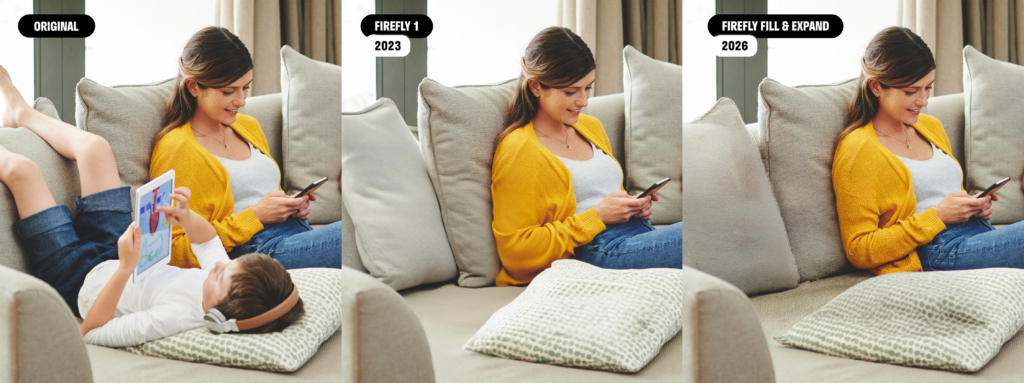
In some respects, Firefly’s more limited capabilities from 3 years ago were actually preferable to the current Fill & Expand 2026 model. Although the new model is much better at maintaining the overall structure of a scene and reproducing textures, this added detail makes it harder to achieve continuity within the image. In the example below, where a child has been removed from the photo, Firefly 1 solved the problem by adding soft textures and reshaping the vertical pillow.
The 2026 version of Firefly maintained more visual consistency, keeping the vertical pillow intact and leaving the indentation in the flat pillow. While this is technically more accurate, visually it leaves an undesirable shadow on the pillow. However, 2026 Firefly wins in the details of the yellow sweater, generating more texture and clearer separation of the fabric around the upper arm.
5. Change details within an image.
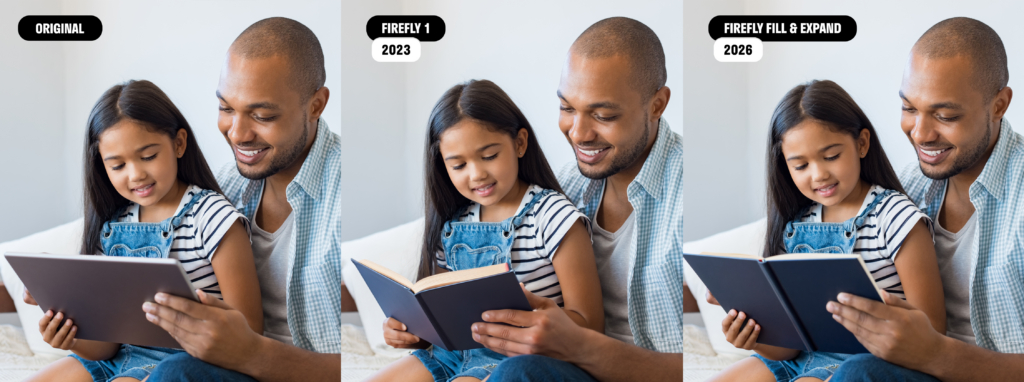
Object replacement still works in much the same way now as it did 3 years ago. Where noticeable improvements have been made are in human features like hands. In the example we tested, the AI-generated book did not differ significantly across either model’s results, but the features are far more accurate and believable now than they were in 2023. The common issue of seeing six fingers on one hand appears to be resolved in the models Adobe uses.
Revisiting the “Two Things” Photoshop AI Can’t Do
In addition to exploring five things that were possible with Photoshop’s AI tools in 2023, we also looked at two key things that the tools could not be expected to do well or at all. Here’s where we stand today with these same things:
1. AI Struggles With Editing People and Animals
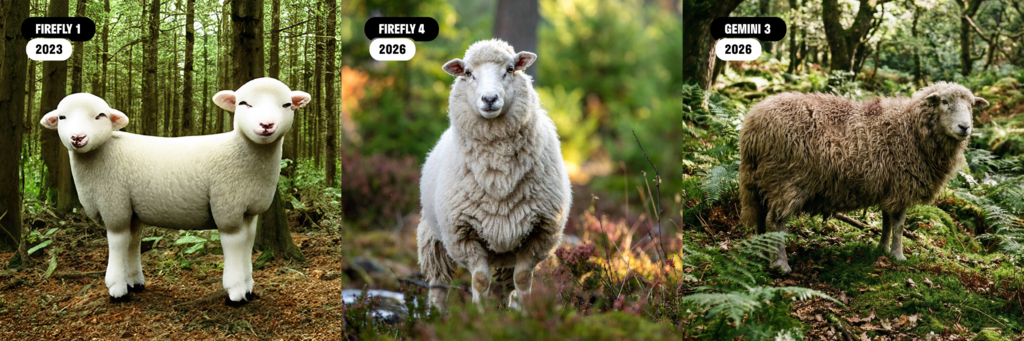
This is almost a non-issue in the latest AI models. Gone are the days of the impossible body shapes and extra appendages. Not only are AI-generated human and animal bodies anatomically correct, with no more fingers on a hand than is typically expected, we have also seen major improvements in skin, hair, and fur.
Early versions of Firefly relied heavily on excessive softening and smoothing effects to achieve skin and fur that looked believable at a glance, but lacked any real depth, texture, or accurate lighting. Results appeared to imitate plastic or rubber surfaces. Body poses were rigid, unnatural, and did not integrate well with the surrounding environment.
Firefly 4 and Gemini partner models are able to produce realistic humans and animals in well-lit scenes, with natural-looking features and skin textures.
2. AI Can’t Replace Graphic Designers
This remains true, but for different reasons. Three years ago, generative AI produced low-resolution images with major visual flaws that needed to be corrected, either through a lengthy (and often frustrating) iterative prompting process that frequently failed, or through manual editing with traditional Photoshop tools.
Today, image quality and resolution have reached a point where images made with generative AI can be used in a professional setting. Options to increase the resolution of AI outputs up to 4k have made the resulting images suitable for most use cases, including print. Improved AI-powered tools like Generative Upscale and the Super Zoom neural filter can help stretch the size and resolution of an image for even greater utility.
What is still missing, though, and where graphic designers and creative teams still need to fill gaps in generative image outputs, is in creative direction. AI still cannot take on the task of conceptualizing an image for a new ad layout or sit in on a brainstorming meeting to establish a compelling new design direction for your next marketing campaign. AI can generate creative assets that are visually impressive, but rarely are they brand-aligned, on-message, or connected to your strategic marketing goals unless prompted extensively to achieve that kind of brand cohesion.
Despite all the improvements we have seen in AI tools and models, the human element is still very much a necessary component of the process. As the tools have become more powerful, the need for human intervention to refine prompts, edit outputs, and put the resulting imagery to use as part of a thoughtful campaign remains a critical piece of the puzzle.
Beyond the Original Five Things
In addition to these improvements to the earlier generation of AI tools in Photoshop, several new tools and features have been launched that are especially interesting in a design workflow.
Harmonize
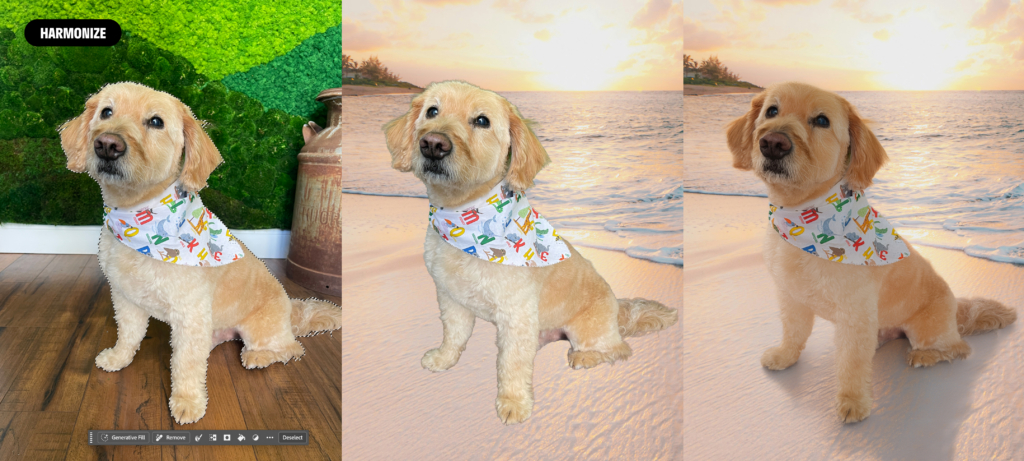
After a long stint in Beta, the Harmonize feature is now fully integrated into the main public-release version of Photoshop. When creating composites or cutting an object from one photo and dropping it into another, Harmonize uses AI to automatically analyze the destination background’s color grading, color temperature, ambient light, and direction. The results match the lighting and tones of the composite layers seamlessly, and Harmonize automatically generates realistic shadows so the object appears to naturally exist in the scene.
Content Credentials
When you use AI in Photoshop, Content Credentials (metadata) are attached to the file, ensuring transparency about an image being AI-generated. Content Credentials are also helpful for attributing non-AI content to actual artists and photographers, as well as appending more camera data to an image to record its full history, from image capture through editing and finalization.
Improved Reference Image Features
This is a game-changer that keeps getting better. You can now add reference images to prompts to aid Photoshop in generating content that adheres to a specific style or composition. Reference images not only assist AI models in matching user intent and shortening prompt writing for the user, but also serve as a reference point to generate new images based on previous output or to match the style of existing content. This is especially helpful for brands that want to maintain a consistent look and feel in their imagery, because reference images can anchor generative AI outputs to established brand styles.
Object Stitch takes reference images a step further by combining some of their features with Harmonize capabilities, letting you place an object into an existing image with matched lighting, perspective, and composition. Instead of using a photo of a jacket as a style reference, you can place that same jacket right into your existing scene and onto the model.
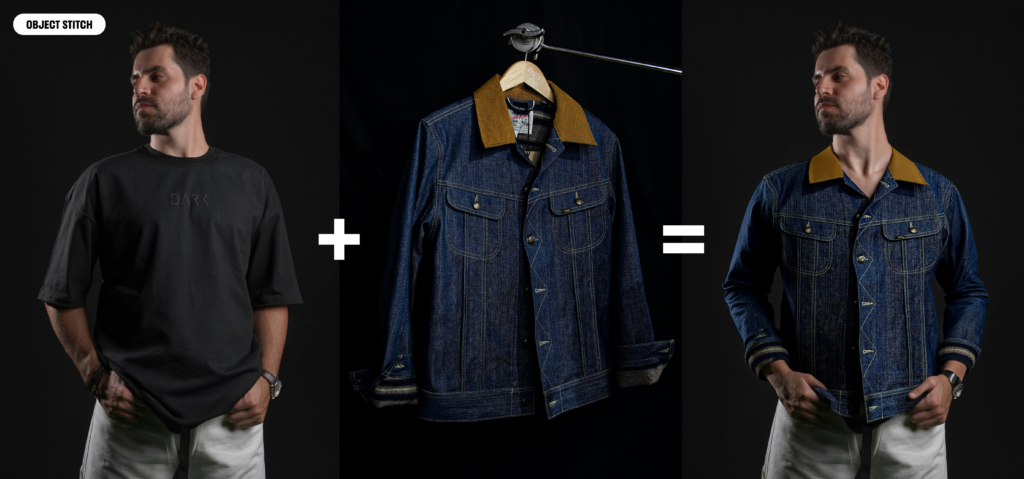
Image Enhancement Tools
High ISO settings in cameras help photographers capture well-lit photos in challenging environments like low-light locations or fast action scenes, but the trade-off is that you end up with a lot of grain or noise in the image details. Traditional noise reduction has always had limited utility, relying on processes that lacked the advantage of AI to better analyze an image and apply de-noising effects in a more nuanced way. Thanks to AI, denoising tools in Photoshop can now cut the grain without destroying details.
Similarly, Photoshop’s AI-driven sharpening tools analyze photos to calculate the specific cause of the softness and then modify the pixels to reverse that specific aberration.
Conclusion
Adobe’s journey over the last three years shows that generative AI has matured from an unpredictable, glitchy novelty into an indispensable professional powerhouse of tools. By overcoming early technical hurdles like anatomical errors, low resolution, and disjointed lighting and textures, Adobe has successfully woven AI into the fabric of the professional creative workflow. Partner models like Google’s Gemini add opportunities to create high-quality images or edit existing ones with even more control over the outcome.
Photoshop’s evolution has transformed the app from a chaotic AI slot machine into a precise, reliable, richly detailed creative workspace that finally delivers on the promise of high-quality AI imaging tools.
The Power of Agentic Marketing
Ridge Marketing is at the forefront of harnessing AI as a force multiplier for marketing departments, from using LLMs to track and improve brand visibility to accelerating image creation, design and development. If you’re looking to leverage AI to get more for your marketing dollars, please reach out to us.
Resources:
https://ridgemarketing.com/blog/5-things-adobe-photoshop-ai-can-do-and-2-that-it-cant/